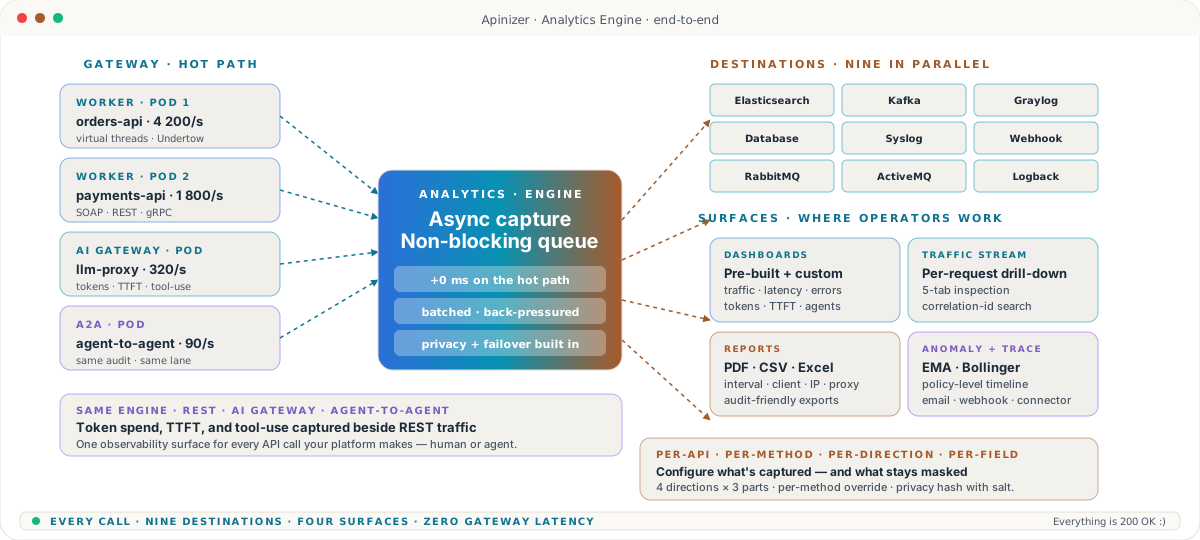
Analytics Engine

Watch every API call. Ship the log everywhere. Answer in seconds.

Async traffic capture from the gateway, fan-out to nine destinations in parallel, dashboards and tracing your operators actually open, and anomaly detection with the math finance teams trust. One observability surface for REST, SOAP, gRPC, AI Gateway, and agent-to-agent traffic.

  • Destinations9 connectors in parallel
  • CaptureAsync · zero hot-path cost
  • TracePolicy-level · 5-min guard

Capabilities · deep dive

Ten properties that turn API traffic into an answer your operators can act on.

Async capture off the hot path, fan-out to nine destinations in parallel, per-API granular control, the dashboards and traffic stream operators actually open, interval and tabular reports with PDF / CSV / Excel exports, policy-level tracing, and anomaly detection with EMA + Bollinger Band — every property a real Apinizer capability, not a roadmap promise.

01 · Async capture

Log every call. Slow zero of them.

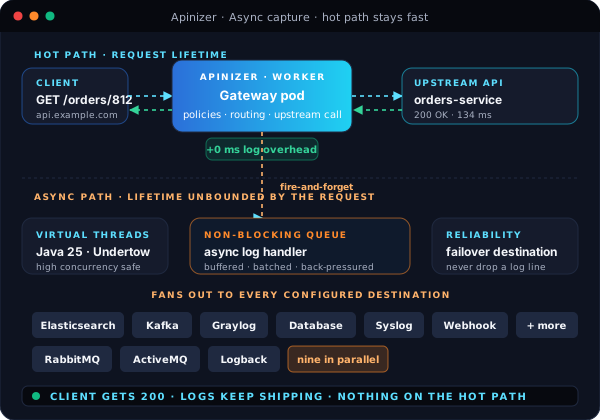
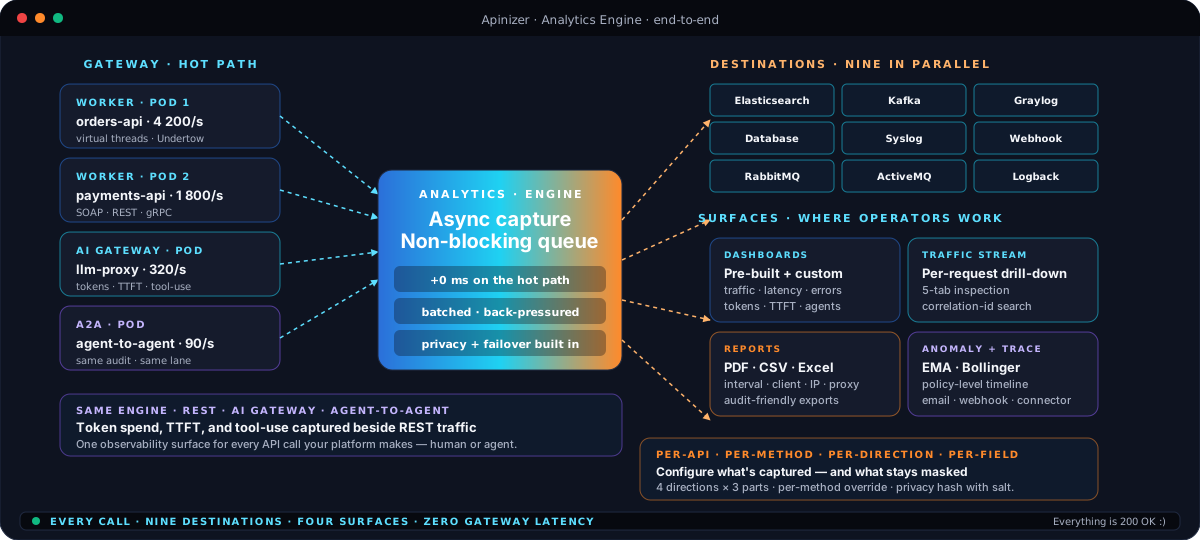
Traffic capture happens off the request lifecycle. The gateway hands the log record to a non-blocking pipeline and keeps serving — clients see the response while the pipeline is still batching, hashing, and shipping. No log shipper sidecar to keep alive, no buffer to overflow, no latency tax for visibility.

  • Capture runs off the hot path — zero added latency on the request
  • Non-blocking, back-pressured queue between the worker and the destinations
  • Batches buffered in memory, shipped on a separate lane
  • Worker pods stay focused on routing and policy execution
  • Same capture covers REST, SOAP, gRPC, AI Gateway, and agent-to-agent traffic
  • Built on virtual threads — high-concurrency safe out of the box
  • Failover destination catches anything a primary connector misses
  • Privacy and masking applied before the record leaves the pod
  • Off the hot path
  • Non-blocking
  • Batched
  • Failover
  • REST · AI · A2A
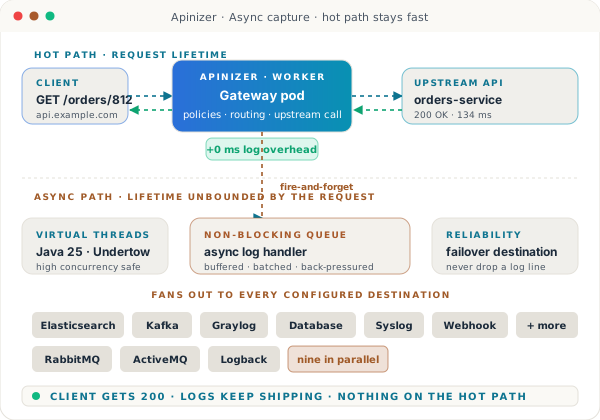
Diagram showing a request flowing through the gateway worker on the hot path on top while a parallel asynchronous log pipeline fans out from a non-blocking queue at the bottom — with chips for nine destination connectors and a green status bar saying the client gets 200 OK while logs keep shipping.

02 · Multi-destination routing

Ship the same log to nine destinations — at the same time.

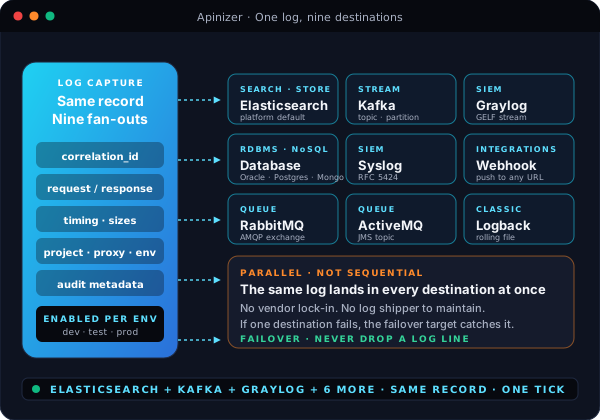
Most gateways pick one log target and force you to wire everything else through a shipper. Apinizer ships the same record to every configured destination in parallel — Elasticsearch for the platform's own dashboards, Kafka for downstream analytics, Graylog for the SIEM team, your SQL database for compliance, plus six more. Same correlation ID across all of them. Same audit trail.

  • Elasticsearch as the platform's built-in search and storage tier
  • Kafka for downstream stream processing and warehouse hand-off
  • Graylog and Syslog for SIEM and compliance pipelines
  • Database connector for RDBMS or document store retention
  • Webhook for any HTTP-reachable system — internal or partner
  • RabbitMQ and ActiveMQ for existing message-bus consumers
  • Logback for classic rolling-file ingest
  • Failover destination so a single connector outage never loses a log
  • Elasticsearch
  • Kafka
  • Graylog
  • Database
  • Syslog
  • Webhook
  • RabbitMQ · ActiveMQ
  • Logback
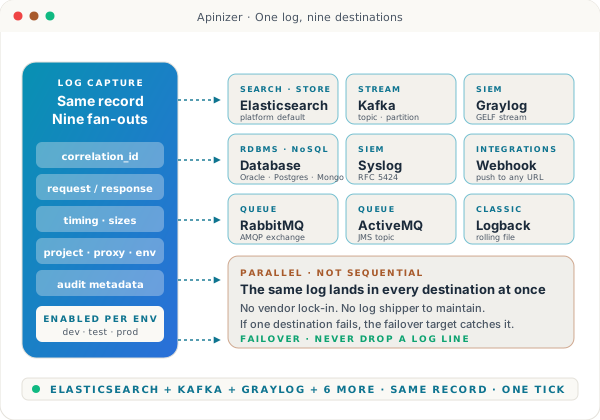
Central log capture node on the left fans out simultaneously to nine destination cards on the right — Elasticsearch, Kafka, Graylog, Database, Syslog, Webhook, RabbitMQ, ActiveMQ, and Logback — with a parallel-not-sequential panel underneath emphasizing that the same record lands in every destination at once.

03 · Granular control

Tell the gateway exactly what to capture — per API, per method, per field.

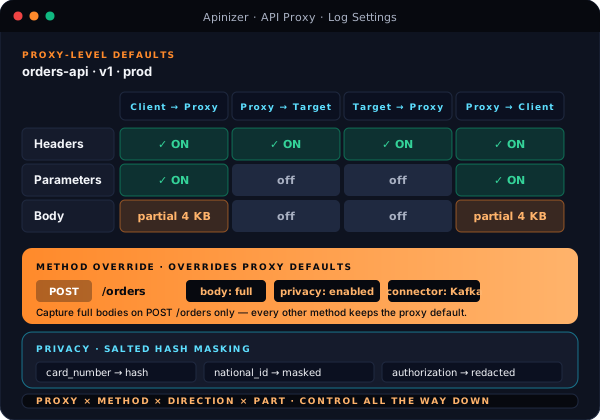
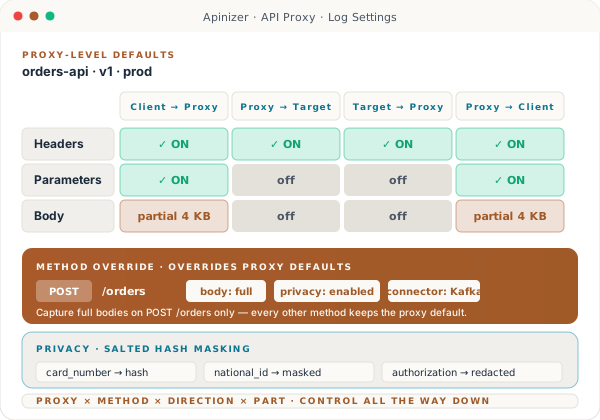
Log settings aren't a single switch. Pick which direction of the call to log — Client to Proxy, Proxy to Target, Target to Proxy, Proxy to Client — and pick which parts of each: headers, parameters, body. Override the proxy default on a single method when one endpoint needs more (or less). Mask sensitive fields with salted hashes before the record ever leaves the pod.

  • Four directions of the call — log any combination, independent of the others
  • Three parts per direction — headers, parameters, body — each toggleable
  • Body capture sized by limit, not all-or-nothing — partial sizes per direction
  • Method-level overrides — POST /orders can log full body, GET /orders cannot
  • Privacy masking with salted hashes for fields like card numbers and IDs
  • Per-environment settings — production stays quiet while dev runs verbose
  • Apply log settings across every proxy in a project with one action
  • Performance metrics (timing and sizes) stay on every record by default
  • Four directions
  • Three parts
  • Method override
  • Partial body
  • Privacy masking
  • Per environment
Log settings matrix view — four request-and-response directions across the top, three log parts down the side (headers, parameters, body) each with on, off, or partial-size toggles; a method override pill below shows the proxy-level defaults being replaced for POST /orders; a privacy masking strip pins to the bottom with hash, masked, and redacted examples.

04 · Dashboards

Dashboards your operators actually open every morning.

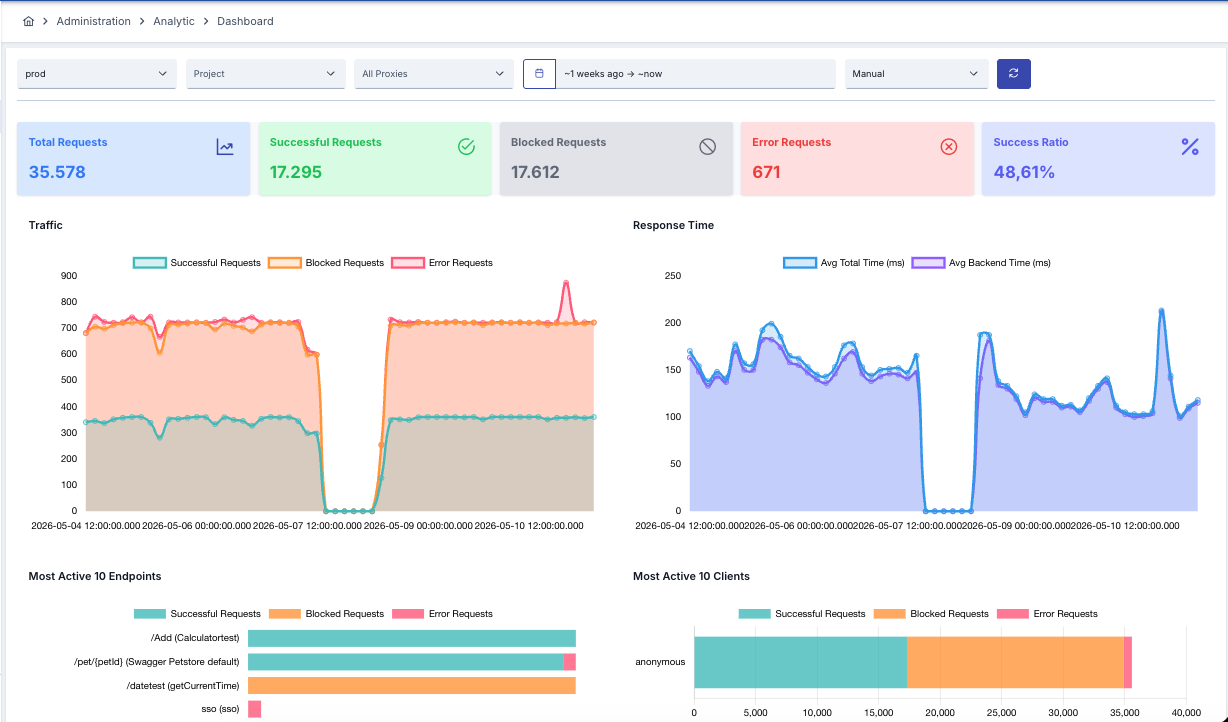
Pre-built dashboards for traffic, latency, errors, and AI token spend show up the moment the platform is live — no Grafana to spin up, no query language to learn, no integration to keep alive. Filter by environment, project, or proxy. Time ranges go from the last five minutes to the last ninety days. When the pre-built view isn't enough, the custom dashboard builder is on the same screen.

  • Pre-built dashboards for traffic, errors, latency, and AI spend ship by default
  • Real-time widgets backed by the platform's Elasticsearch tier
  • Time ranges from the last five minutes to the last ninety days
  • Filter by environment, project, proxy, status, or any indexed field
  • Most-active endpoints and most-active clients surfaced on the same view
  • Custom dashboard builder for the questions that aren't pre-built
  • Per-project visibility so teams only see what they own
  • Dashboards refresh on the cadence operators pick — manual, 30s, 1m, 5m
  • Pre-built widgets
  • Custom builder
  • Five min to ninety days
  • Per project visibility
  • Real-time refresh
Apinizer Analytic Dashboard — top filter strip with environment, project, proxies, and a one-week time range; KPI cards for total, successful, blocked, error requests and success ratio; large traffic and response-time area charts; bar charts for most-active endpoints and most-active clients.

05 · Traffic stream

Every call, searchable. Every search, one click from the request body.

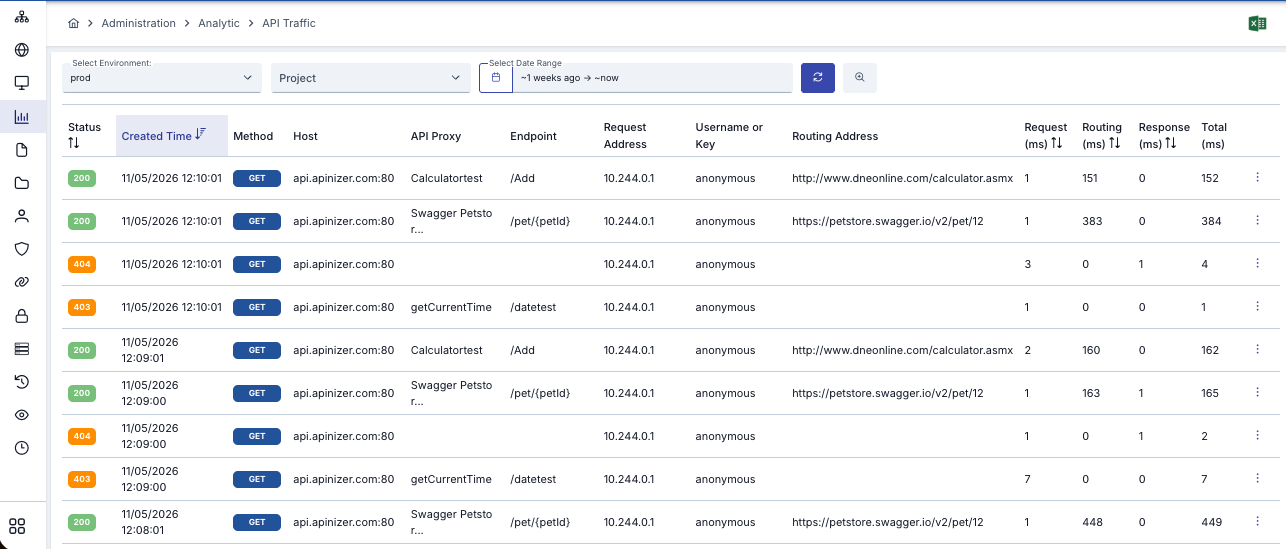
The Analytic Traffic view is the operator's drill-down lane: every recorded request, every status code, every routing address. Filter by environment, project, proxy, date range. Sort by request, routing, or response milliseconds. Pick a row and the full request — headers, body, response, the upstream that served it — opens in the next pane.

  • Every recorded call surfaced as a sortable, filterable row
  • Status, method, host, proxy, endpoint, request address, user, routing address
  • Per-call timing split across request, routing, response, and total milliseconds
  • Pivot to a single proxy, a single user, or a single endpoint with one click
  • Excel export on the table — handy for offline analysis or audit packs
  • Free-text keyword search across every indexed field
  • Result limit of 100 rows per page, paginated for deep history
  • Same row format whether the call was REST, SOAP, gRPC, or an AI request
  • Sortable
  • Filterable
  • Per-call timing
  • Excel export
  • Keyword search
Apinizer API Traffic table — filter strip for environment, project, and date range; a sortable table with columns for status badge, created time, method, host, API proxy, endpoint, request address, user, routing address, and request, routing, response, total milliseconds.

06 · Per-request inspection

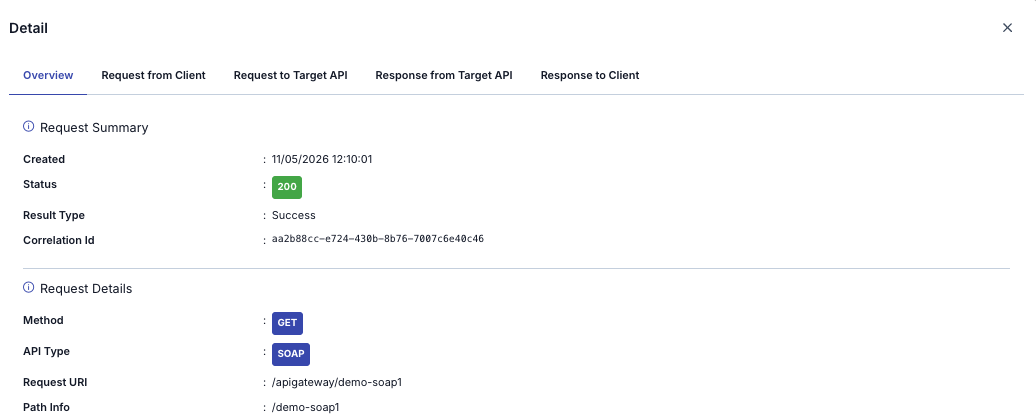
Reproduce a failed call across five inspection tabs.

Click a row in the traffic stream and the full request opens behind five tabs — Overview, Request from Client, Request to Target, Response from Target, Response to Client. Correlation ID, status, result type, request URI, headers, parameters, body — everything captured on the way in and on the way out. The same view that helps a developer debug a 500 is the view a compliance officer uses to prove what was sent.

  • Five inspection tabs — Overview, From Client, To Target, From Target, To Client
  • Correlation ID lets you follow a single call across every system it touched
  • Status, result type, created time, and request URI on the overview pane
  • Full headers, parameters, and body on each direction tab
  • Re-run the request from the trace screen when you need to reproduce
  • Privacy masks honored — auditors see what they need, not what they don't
  • Same screen handles SOAP and REST — type chip identifies the protocol
  • Linkable URLs — share a request with a colleague without uploading anything
  • Five tabs
  • Correlation ID
  • Full headers + body
  • Reproducible
  • Audit-friendly
Apinizer per-call Detail panel — tabbed header with Overview, Request from Client, Request to Target API, Response from Target API, Response to Client; the Overview tab shows the request summary with created time, status 200, result type Success, correlation ID, request details with method, API type SOAP, request URI, and path info.

07 · Interval reports

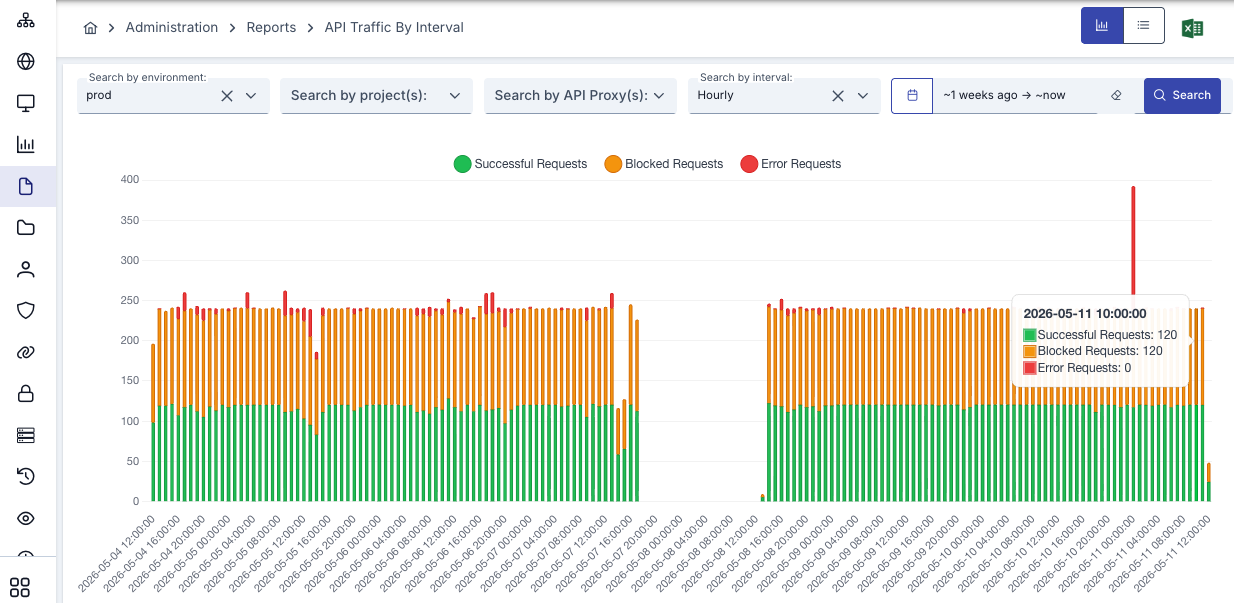
Capacity planning with a chart auditors and capacity planners can both read.

The interval report breaks traffic into time buckets — hourly, daily, weekly — and stacks successful, blocked, and error calls on the same bar. Pick the environment, the project, the proxy, the date range. Excel-export the chart data straight from the page header. Spot the Wednesday-morning blip, the Friday-evening spike, the policy change that started bouncing requests at 04:00 last Tuesday.

  • Stacked bars per interval — successful, blocked, and error side by side
  • Interval picker — hourly, daily, or weekly buckets
  • Filter by environment, project, and one or many proxies
  • Time range from last few hours to a full year
  • Hover any bar for exact counts at that interval
  • Switch between chart view and tabular view with one toggle
  • Excel export from the page header — same numbers as the chart
  • Backed by Elasticsearch's time-series aggregations — no manual rollups
  • Stacked bars
  • Hourly · Daily · Weekly
  • Hover detail
  • Chart + table
  • Excel export
Apinizer API Traffic By Interval report — filter strip for environment, projects, proxies, interval Hourly, and a one-week date range; a stacked bar chart with successful, blocked, and error requests; tooltip on a bar showing exact counts at 2026-05-11 10:00.

08 · Tabular metrics

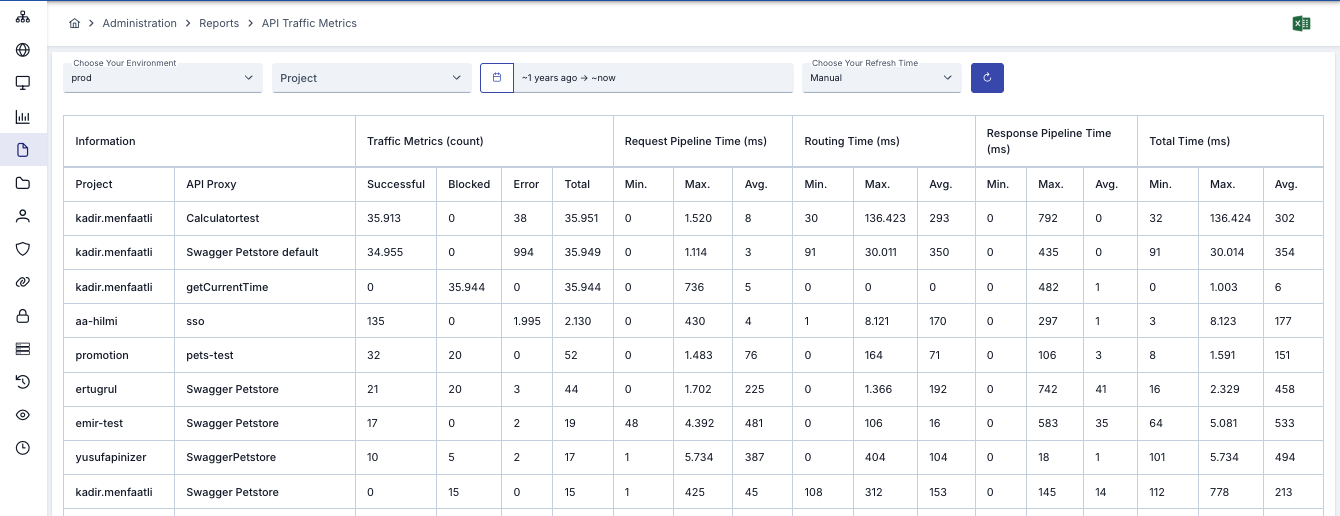
Tabular metrics auditors actually accept as evidence.

When the SLA conversation moves to a tabular review, the API Traffic Metrics report has the numbers. Per project, per proxy: successful, blocked, error counts. Min, max, and average milliseconds for the request pipeline, routing time, response pipeline, and total time — every column you'd need to write a quarterly capacity letter. PDF, CSV, and Excel exports built in.

  • One row per project + proxy combination — flat and sortable
  • Traffic count columns — successful, blocked, error, total
  • Request pipeline time — min, max, and average milliseconds
  • Routing time and response pipeline time broken out separately
  • Total time column for the SLA-style headline number
  • Date range up to one year — covers a full audit window
  • PDF, CSV, and Excel exports — pick the format your reviewer wants
  • Same data backs the per-project visibility model — teams see their own
  • Per project · proxy
  • Min · Max · Avg
  • Pipeline + routing time
  • PDF · CSV · Excel
  • One-year window
Apinizer API Traffic Metrics report — environment, project, and date range filter strip; a wide table with project, API proxy, traffic metrics count (successful, blocked, error, total), and request pipeline time, routing time, response pipeline time, and total time columns each with min, max, and average milliseconds.

09 · Live tracing

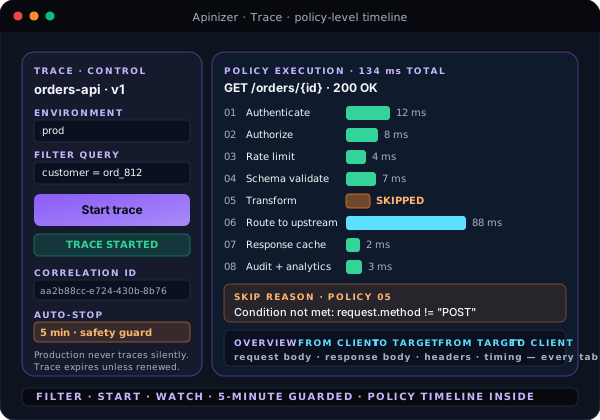
Tracing built into the runtime — policy by policy.

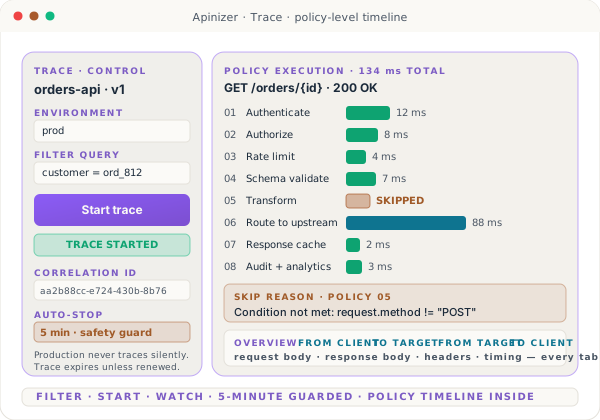
When dashboards aren't enough and the log line isn't enough, start a trace. Pick the environment, narrow with a filter query, hit Start. Every captured request shows up with a policy-level timeline — which policy ran, which one was skipped and why, how long each took. Production never traces silently: every session expires after five minutes unless renewed.

  • Start a trace from the proxy page — environment + filter query
  • Policy-by-policy execution timeline with timing bars
  • Skip reasons surfaced when a policy's condition didn't fire
  • Same five-tab inspection per traced request as the regular traffic view
  • Filter queries built and reused — full traffic, single user, single endpoint
  • Auto-stop after five minutes — production never traces silently forever
  • Correlation ID printed beside every traced row
  • Delete a session's logs with one action when the trace is over
  • Filter-by-query
  • Policy timeline
  • Skip reasons
  • Five-minute auto-stop
  • Correlation ID
Trace control panel on the left with environment, filter query, a green Trace Started chip, correlation ID, and a five-minute auto-stop notice; a horizontal policy timeline on the right showing eight policies executing in sequence with timing bars and a skip-reason annotation on the transform policy.

10 · Anomaly detection

Anomaly detection with the math finance teams trust.

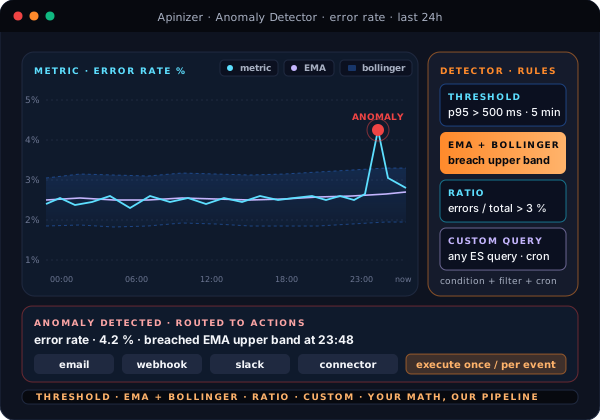
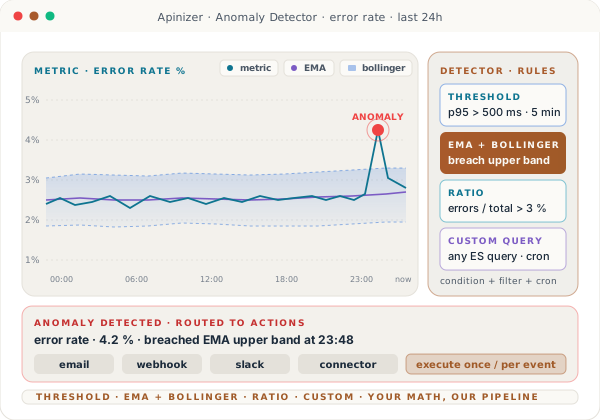
Threshold rules catch the obvious. EMA with Bollinger Band catches the subtle drift — error rate creeping above the band it's been hugging for six hours. Ratio rules catch the proportional shift — cache miss rising 3× without raw counts moving. Custom queries cover everything else. Every detector fires actions you already use: email, webhook, or any of the nine connectors.

  • Threshold rules — p95 latency, error rate, request count breaches
  • EMA with Bollinger Band — flags drift the threshold doesn't see
  • Ratio rules — proportional shifts on cache, errors, blocked traffic
  • Custom Elasticsearch queries — any detector you'd hand-roll, supported
  • Cron-style scheduling on every detector — every 5 min, every hour, every day
  • Conditions chained with and-logic so a rule fires only when both sides agree
  • Actions — email, webhook, connector — run once per series or per event
  • Detection history kept and chartable so operators can prove the trend
  • Threshold
  • EMA + Bollinger
  • Ratio
  • Custom query
  • Cron schedule
  • Multi-channel actions
Time-series chart with an error-rate metric line, an EMA smoothed centerline, and a shaded Bollinger Band between an upper and lower band; a spike on the right pierces the upper band and is flagged as an anomaly; rules panel on the right shows threshold, EMA + Bollinger, ratio, and custom-query detectors; alerts strip at the bottom routes the anomaly to email, webhook, slack, and connector channels.

In the box

What's included

The capabilities below are part of the standard install — no add-on SKUs and no separate licenses.

Collection & storage

  • Async, non-blocking capture from every gateway pod
  • Elasticsearch with Index Lifecycle Management
  • Per-environment log settings — dev verbose, prod quiet
  • Per-API, per-method, per-direction, per-field control
  • Salted-hash privacy masking before the record leaves the pod
  • Failover destination for undelivered traffic
  • Same engine for REST, SOAP, gRPC, AI Gateway, and A2A
  • Correlation ID stamped on every log line

Visualization, alerts & reports

  • Pre-built dashboards — traffic, errors, latency, AI tokens
  • Custom dashboard builder for the questions that aren't pre-built
  • Traffic stream with five-tab per-request inspection
  • Interval and tabular metrics reports with PDF / CSV / Excel export
  • Anomaly detection — threshold, EMA + Bollinger, ratio, custom
  • Alerts via email, webhook, or any of the nine connectors
  • Live tracing with policy-level timeline and five-minute auto-stop
  • Per-project visibility and team-level access controls

Observability without the build-out

Stop guessing about your API traffic.

See pre-built dashboards, live traffic drill-down, policy-level tracing, and anomaly detection — wired up to your gateway in a thirty-minute walkthrough.